Hello, I am having some issues with my website, and I am not able to understand why hence how to fix them.
Site name: apexmanagement.netlify.app
Site domain: https://apexbuildingandmanagement.com.au/
Domain Provider: Crazy Domain
Email Provider: Microsoft 356 Business Basic Plan
Website Stack: Angular + Emailjs (using this to send the form date from my website to the custom domain email)
Deploy type: Manual
Issues:
I am encountering 3 issues:
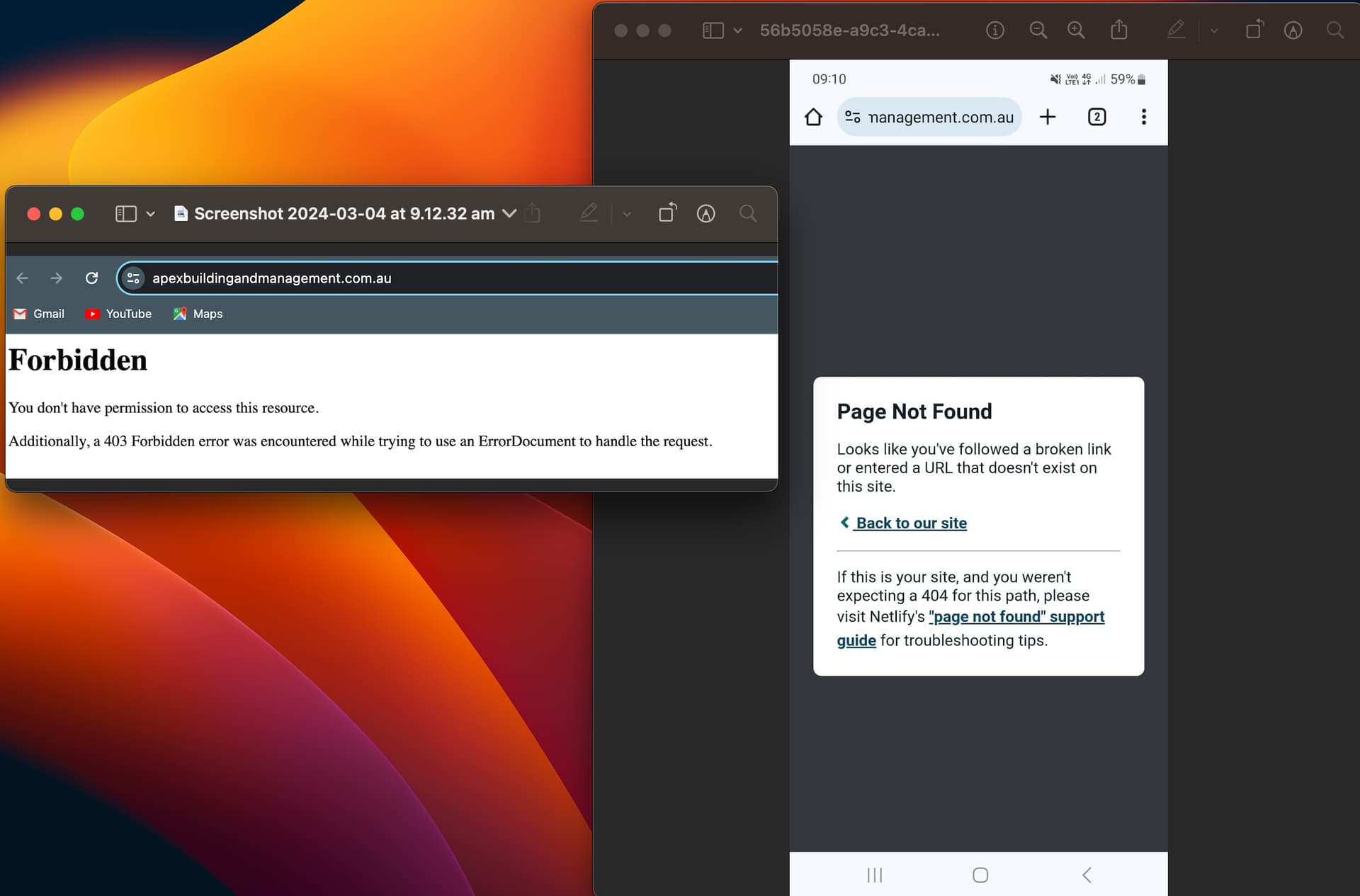
I deploy the website, this goes well. Then when I try to open the website with the custom domain it gives (sometimes) 403 error: You don’t have permission to access this resource. Additionally, a 403 Forbidden error was encountered while trying to use an ErrorDocument to handle the request.
But sometimes, when it loads the website, if i refresh the page it shows the error pop up of: “Page not found, go back to website”.
Domain Connection. I have added the name servers to crazy domain. The connection seems to be fine but I dont understand why the errors I decribed above.
I want to use a custom domain with outlook. I have connected the spf, cname, and mx, i wanted to connect the dkim but neltify doesnt seem to provie this type. I have been runnin this command to see how the propagation is going and the answer i get:
nslookup -type=mx apexbuildingandmanagement.com.au
However when i test the connection sending an email thru emailjs i get the following:
412Outlook: A participant without an email address is not allowed for ReplyTo property.
Thank you for your answer.
To your response: This isn’t an error from Netlify. This reads like the default error message on an Apache server. Does this happen on multiple devices or just one?
Yes, the same error appears in different devices. But that isn’t the only error. what also happens is that when the site loads. And i refresh the page, it give an error from Netlify. (View images of the two erros i encounter when loading the page)
The error on the left it an Apache-style error message. This I cannot explain outright. Possibly the DNS of that computer system or network is stale. It may need flushing/rebooting to clear.
The error on the right is a Netlify error message. This error is showing because the site is built as an SPA (this is likely unnecessary; a purely static HTML/CSS/JS non-SPA site would suffice.) The solution to this is in
Hi, @micapiacenza. It look like you are running into issues with the previous DNS records sometimes being returned due to time to live (TTL) issues as mentioned above. I don’t think the 403s are from Netlify but are instead coming from some previously used service.
About getting the email to work again, there is a support guide about this here:
There are three solutions in that section above. I would recommend solution 3 in this situation. Revert back to your registrar’s DNS service and then use the external DNS instructions instead:
If there are any questions about that solution or the other two (whichever you are most interested in), please let us know.
Hi, thank you for your reply, it has been very helpful. I was just wondering if I could connect DKIM with Netlify. When I go to add a new record doesn’t seem to have that option? At this point, the MX, TXT and CNAME connection from Netlify seems to be correct.
Okay, thank you for clarifying that. So I have two host for DKIM. I would add a record of type TXT for each host? SO in summary, this is what i have to connenct and the types for Netlify:
MX Record - Record type in netlify: MX
Host: apexbuildingandmanagement.com.au
TTL: default
Value: x
CNAME Record - Record type in netlify: CNAME
Host: x
TTL: default
Value: x
SPF Record - Record type in netlify: TXT
Host: x
TTL: default
Value: x
DKIM Record
Record type in netlify: TXT
Host: selector1.x
TTL: default
Value: x
Another Record type in netlify: TXT
Host : selector2.x
TTL: default
Value: x