- Site: contigoerp
Context
I have a form with some fields with the same label. It submits well and Netlify UI shows all the fields even the repeated ones. The problem is that in the email notification it’s not sending all the fields, the ones that are repeated are beign overwritten:
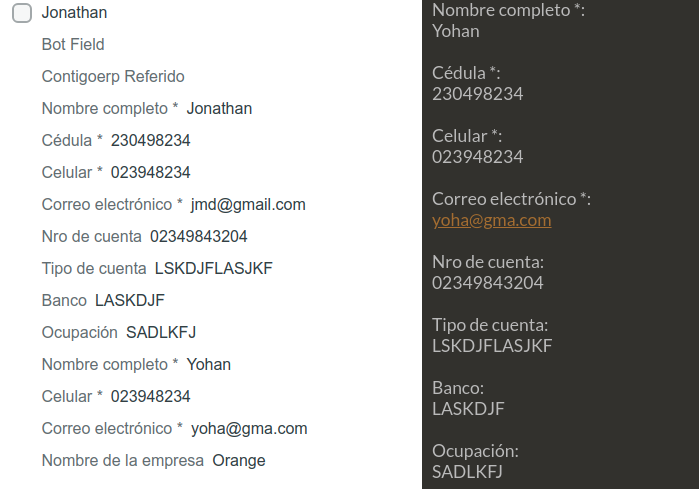
Left side is netlify UI and right side is email notification.
I tried to fix it changing to a stateful react form, but even when I’m sending an object with different properties it is still taking the label values as propertie names so in the email notification it keeps overwritting.
CODE
function ReferredForm() {
const [formData, setFormData] = useState({})
  const handleChange = ({ target }) => {
    setFormData({ ...formData, [target.name]: target.value })
  }

  const encode = data => {
    return Object.keys(data)
      .map(key => encodeURIComponent(key) + "=" + encodeURIComponent(data[key]))
      .join("&")
  }
  const handleSubmit = e => {
    fetch("/", {
      method: "POST",
      headers: { "Content-Type": "application/x-www-form-urlencoded" },
      body: encode({ "form-name": "contigoerp-referido", ...formData }),
    })
      .then(() => navigate("/gracias"))
      .catch(error => alert(error))

    e.preventDefault()
  }

  const referrerData = (
    <>
      <label htmlFor="referrerName">
        Nombre completo *
        <input
          id="referrerName"
          name="referrerName"
          type="text"
          aria-label="referrerName"
          placeholder="Nombre"
          value={formData.referrerName || ""}
          onChange={e => handleChange(e)}
          required
        />
      </label>
      <label htmlFor="referrerId">
        Cédula *
        <input
          id="referrerId"
          name="referrerId"
          type="number"
          aria-label="referrerId"
          placeholder="Cédula"
          value={formData.referrerId || ""}
          onChange={e => handleChange(e)}
          required
        />
      </label>
      <label htmlFor="referrerPhone">
        Celular *
        <input
          id="referrerPhone"
          name="referrerPhone"
          type="tel"
          aria-label="referrerPhone"
          placeholder="Celular"
          pattern="[0-9]{7,10}"
          value={formData.referrerPhone || ""}
          onChange={e => handleChange(e)}
          required
        />
      </label>
      <label htmlFor="referrerEmail">
        Correo electrónico *
        <input
          id="referrerEmail"
          name="referrerEmail"
          type="email"
          aria-label="referrerEmail"
          placeholder="Correo electrónico"
          value={formData.referrerEmail || ""}
          onChange={e => handleChange(e)}
          required
        />
      </label>
      <label htmlFor="referrerAccount">
        Nro de cuenta
        <input
          id="referrerAccount"
          name="referrerAccount"
          type="number"
          aria-label="referrerAccount"
          placeholder="Nro de cuenta"
          value={formData.referrerAccount || ""}
          onChange={e => handleChange(e)}
        />
      </label>
      <label htmlFor="referrerAccountType">
        Tipo de cuenta
        <input
          id="referrerAccountType"
          name="referrerAccountType"
          type="text"
          aria-label="referrerAccountType"
          placeholder="Ahorros | Corriente"
          value={formData.referrerAccountType || ""}
          onChange={e => handleChange(e)}
        />
      </label>
      <label htmlFor="referrerBank">
        Banco
        <input
          id="referrerBank"
          name="referrerBank"
          type="text"
          aria-label="referrerBank"
          placeholder="Banco"
          value={formData.referrerBank || ""}
          onChange={e => handleChange(e)}
        />
      </label>
      <label htmlFor="referrerPosition">
        Ocupación
        <input
          id="referrerPosition"
          name="referrerPosition"
          type="text"
          aria-label="referrerPosition"
          placeholder="Ocupación"
          value={formData.referrerPosition || ""}
          onChange={e => handleChange(e)}
        />
      </label>
    </>
  )

  const referredData = (
    <>
      <label htmlFor="referredName">
        Nombre completo *
        <input
          id="referredName"
          name="referredName"
          type="text"
          aria-label="referredName"
          placeholder="Nombre"
          value={formData.referredName || ""}
          onChange={e => handleChange(e)}
          required
        />
      </label>
      <label htmlFor="referredPhone">
        Celular *
        <input
          id="referredPhone"
          name="referredPhone"
          type="tel"
          aria-label="referredPhone"
          placeholder="Celular"
          pattern="[0-9]{7,10}"
          value={formData.referredPhone || ""}
          onChange={e => handleChange(e)}
          required
        />
      </label>
      <label htmlFor="referredEmail">
        Correo electrónico *
        <input
          id="referredEmail"
          name="referredEmail"
          type="email"
          aria-label="referredEmail"
          placeholder="Correo electrónico"
          value={formData.referredEmail || ""}
          onChange={e => handleChange(e)}
          required
        />
      </label>

      <label htmlFor="referredCompanyName">
        Nombre de la empresa
        <input
          id="referredCompanyName"
          name="referredCompanyName"
          type="text"
          aria-label="referredCompanyName"
          placeholder="Empresa"
          value={formData.referredCompanyName || ""}
          onChange={e => handleChange(e)}
        />
      </label>
    </>
  )

  return (
    <Form id="referido" onSubmit={handleSubmit}>
      <input type="hidden" aria-label="antispam" name="bot-field" />
      <input
        type="hidden"
        aria-label="form-name"
        name="contigoerp-referido"
        value="Referido"
      />
      <h1 style={{ marginTop: "1em" }}>
        Refiere a alguien que esté interesado en ContigoERP
      </h1>
      <fieldset style={{ marginBottom: "3em" }}>
        <h2>Datos del referente</h2>
        <section className="fields">{referrerData}</section>
      </fieldset>
      <fieldset>
        <h2>Datos del referido</h2>
        <section className="fields">{referredData}</section>
      </fieldset>
      <section className="actions">
        <Button type="submit" mb="0">
          Enviar
        </Button>
      </section>
    </Form>
  )
}
Thanks in advance for your help.

